QNX Self-Hosted Developer Desktop -- Initial Release
Try out the initial release of the QNX Developer Desktop -- a self-hosted development environment for QNX. No more cross-compilation!

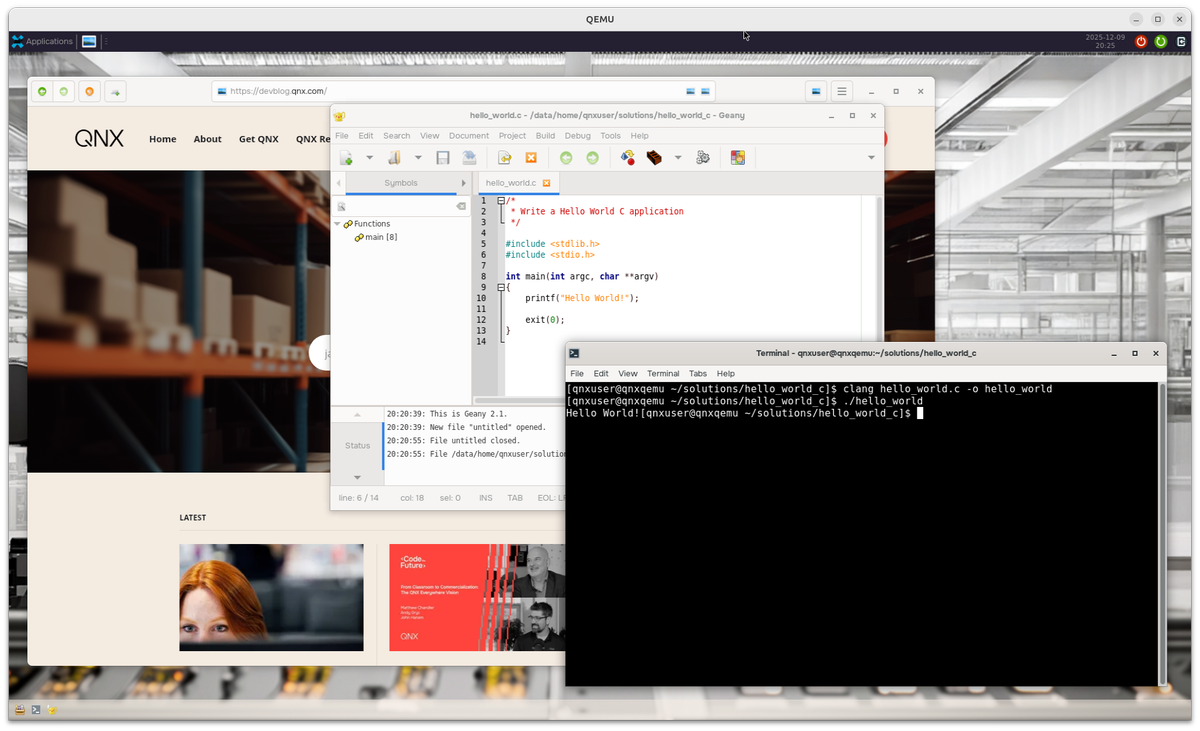
The team and I are beyond excited to share what we've been cooking up over the last little while: a full desktop environment running on QNX 8.0, with support for self-hosted compilation! This environment both makes it easier for newly-minted QNX developers to get started with building for QNX, but it also vastly simplifies the process of porting Linux applications and libraries to QNX 8.0.
This self-hosted target environment is pre-loaded with many of the ports you'll find on the QNX Open-source Dashboard. (The portal currently includes over 1,400 ports across various targets, QNX versions, and architectures, of which more than 600 are unique ports!)
In this initial release, you can grab a copy of the QEMU image and give it a try for yourself. There's still so much more to add, but it's in a great place today for this first release. The team is really passionate about this one, and we're eagerly looking forward to your feedback!
What's Included
For the initial release of Desktop, we tried to cover all the basics: windowing, terminal, IDEs, browser, file management, and samples. To that end, here's what makes up the QNX Developer Desktop:
- A customizable XFCE desktop environment running on Wayland
- The tools you need to compile and/or run your code (
clang, gcc,clang++, Python,make,cmake,git, etc) - A web browser (can you join the QNX Discord from the QNX Desktop? 🏅👀)
- Ports of popular IDEs/editors, like Geany, Emacs, Neovim, and vim
- Thunar, for file management
- Preloaded samples, like Hello World in C, C++, and Python, and GTK demos OpenGL ES demos
- ... and of course, a terminal.
System Requirements
This environment runs as a virtual machine, using QEMU on Ubuntu. To try the image, you'll need:
- Ubuntu 22.04 or 24.04
Try It Yourself
(Keep in mind this is the first release, so it takes a minute to get started and it's a bit rough around the edges.)
With a free QNX license, you can find this release in QNX Software Center. On the Available tab of the Manage Installation pane, search for "quick start" and install the "QNX SDP 8.0 Quick Start Target Image for QEMU".
You'll find the image in your QNX installation directory, usually ~/qnx800/images by default. Follow the README.md file in the qemu directory to extract & combine the multiple QNX packages downloaded under the hood.
Next, follow the PDF instructions found in the new ./qemu_qsti/docs/ directory to install the required dependencies and boot up.
What's Next
This is just the very first release! Over the next few months and beyond, we'll drop more updates of Desktop. You can look forward to:
- QEMU images for Windows & macOS, and native images for x86
- A native Desktop image on Raspberry Pi
- Enhanced documentation
- Features to help use this self-hosted environment in CI jobs
- More samples & stability
- ... and more! Have suggestions? Let us know.
Get Help and Share Feedback
Lastly, if you want some help with your QNX journey, you can find the QNX team and community:
- in Discord here: discord.gg/Jj4EkkrFTT
- on Reddit at: reddit.com/r/qnx